
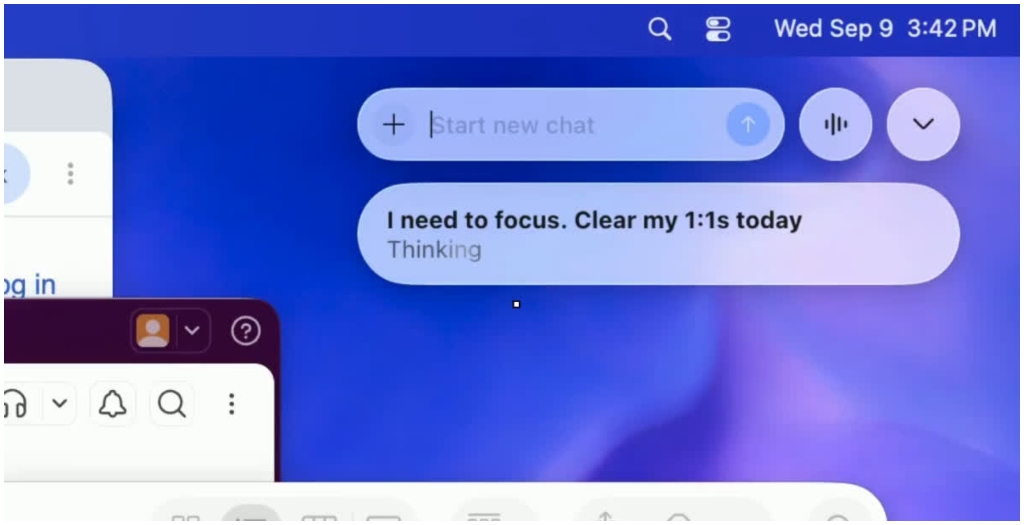
Patna: ChatGPT has introduced a new Pets feature for its desktop app, allowing users to start chats and monitor ongoing tasks without opening the full application.

The feature places small animated characters on the computer screen that remain visible above other windows. They indicate when ChatGPT is working on a task or waiting for a response.
Start Chats Without Opening The App

A small input box appears below the Pet, allowing users to type or speak a request directly. This means users can begin a new chat while continuing to work in another application.
Demonstrations of the feature show users giving commands such as asking ChatGPT to help them focus or clear their day’s meetings. The Pet processes the request and displays the response without requiring the full app to be opened.
Mini Mode Offers A Simpler Interface
Users who do not want an animated character can choose the Mini option. It provides a compact control panel while retaining the main functions of the Pets feature.
The Mini interface takes up less screen space and allows users to start chats, check updates and interact with ChatGPT without opening the main desktop window.
Customisation And Shortcuts
Users can choose from built-in Pets or create a custom Pet through the settings. The feature can be accessed by opening the desktop app, going to Settings, selecting Pets and choosing either Pet or Mini.
Users can then enter the “/pet” command or select the option from the command menu. The feature also supports Option+Space on macOS and Windows+Alt+P on Windows.
The same command or shortcut can be used to hide the Pet. The feature is available on both macOS and Windows.
Designed For Less Workflow Disruption
The update is designed to make ChatGPT easier to use alongside other desktop tasks. By keeping task updates and chat controls visible, users can interact with ChatGPT without repeatedly switching to the full application